Tuesday, June 7, 2016

prezi possiblities

Prezi is a cloud-based presentation software based on a software as a service model, according to Wikipedia. Prezi has four user levels, the Public or free version, Enjoy, Pro, and Prop Plus.  Each level has added features such as making presentations private, offline service, amount of storage and more.  Prezi features a zooming user interface (ZUI), which allows users to zoom in and out of their presentation media as well as navigate through information in a variety of dimensions.

Prezi provides individuals with an alternative to PowerPoint and Google Slides for their presentation needs. There are many proponents for choosing Prezi over others including Clare Sutton who wrote an article 5 Reasons to Use Prezi Rather Than PowerPoint written in 2014.  In this article, the reasoning to use Prezi include the following:
  • More dynamic and captivating
  • Better suited for the digital age
  • Cloud based 
  • Audience gets a better presentation overview
  • Over 40 million people are using it
Since this article is a couple years old it should be noted that PowerPoint and Microsoft Office now offer cloud based storage as well. However, Prezi still has other presentation services beat with its "dynamic and captivating" style.  

For some examples of what Prezi can do for you or any business, check out PreziBlog's 6 Best Prezis of 2015! This list of Best Prezi's highlights the best overall design and the best in business as well as a few other categories.  These Prezi's all utilize the zooming and panning features extremely well and include great graphics.

Businesses can learn from these "Best of's" and strive to include similar features for their business pitches or other presentations. Prezi's website offers helpful hints and tips including a series of workshops a series of videos and training sessions.  Spending a little extra time learning about a new presentation software could help any business stand out when pitching new ideas.


As for being social media, Prezi allows for up to ten users to work on the presentation in different sections at the same time, which Prezi refers to as co-editing.  Here is a helpful video for anyone interested in trying it out. With Prezi you can work as a group from one version eliminating the confusion of multiple drafts.  It is also stored in the cloud so you can access it from anywhere there is internet. Prezi also allows you to "present as a team, remotely handing over the lead to anyone, anywhere" which sounds like an excellent feature for global businesses.

My use of Prezi for presentations has been limited.  I tried to use the product once in 2012 according to my dashboard on the site, but ended up abandoning the presentation halfway through due to a time constraint.  As I recall, it took me a lot of time to set up a visually appealing template and presentation and I had other items to attend to while in my undergraduate studies then creating a dynamic presentation.  In my graduate career, I had forgotten about Prezi and trying to use it again. Perhaps if I took the time to set up an easy to use template for myself I might be more inclined to use the platform for presentations. Admittedly it has been four years since my last use and likely the site has worked out many bugs and issues since my original attempt.  Prezi is definitley something to think about as the next round of group projects approaches. 

Wednesday, June 1, 2016

tumblr teachings

Tumblr, created in 2007, is a microblogging platform and social networking website now owned by Yahoo!. Tumblr hosts over 290 million blogs and has over 555 million monthly visitors according to wikipedia.com. Tumblr is a popular media for teens and college aged students with most users under 25 years old. Users on the site follow others and see those blog posting on their dashboard.  Users are able to tag their postings and queue them for future postings.  Tumblr allows users to post images, gifs, links, chats, quotes, text, videos, and audio as well as send chat messages to one another privately.

For businesses, the best way to get your content in front of the users is through sponsored posts.  While businesses and brands can generate their own content, users have to follow these businesses to see the post or follow someone who has reposted the content.  With a sponsored post, the video or image will appear for a large portion of users without them following the company. Tumblr also provides a lot of data back to the companies to assist in their marketing including analytics and case studies.

As a user of Tumblr, I very rarely follow big businesses such as Coca-Cola or similar.  Most of the blogs I follow are random people who share a common interest with me such as theatre, cross stitching, favorite television shows, political movements I am interested in, similar health issues, grad school students, librarians, people I know, and other random ones.  The businesses I follow would include companies like Buzzfeed, NPR, the National Park Services, Broadway.com, some Etsy shop owners, and some television shows run by the actual company like Food Network.

Most of the businesses that I follow are pushing content from their home websites onto tumblr. For example, NPR often posts article thumbnail and headlines as their tumblr posts.  On occasion they will post longer content such as the entire article with pictures or reblog what someone else has written with an added comment.  For some businesses this is the best use of tumblr.  For bigger businesses with money it is better to buy the sponsorship and have more direct advertising.  For example, Game of War which has a short video of the game being advertised as a sponsored post. Some companies like Nike or Starbucks will even do a Sponsored Day where they are the only sponsored ad that will come up on tumblr that day.

The trick for the businesses is to generate content that is interesting enough that someone will want to reblog.  If a post is reblogged it will stay on that user's blog until deleted, which creates a catch-22.  Content must be able to last a long time as it could be reblogged around the internet for months if not years.  If your company posts about a specific product and provides a link and that gets reblogged for months, the consumer will want to be able to click the link and still buy the product not find a dead end or no webpage. You don't want to make potential customers upset by not having working links.

Personally, I try to keep my dashboard free from "purchase me" postings and stick to the companies that are generating interesting content such as news articles or stunning photos.  Often I will even unfollow others if they begin posting too much about "buy this" or "buy that." But I could be far from the norm as I am an older user to the site and maybe those younger than me really are using tumblr to purchase products.  For larger companies that can afford the sponsored posts, it is a great way to keep the name in front of an audience since it cannot be deleted just scrolled past. For individuals looking for a quick and easy blogging site mostly made up of photos, tumblr is something you should check out. For businesses, I am not sold it is something worth the time and money for marketing your product, perhaps just keeping your brand in a positive light.

Monday, May 30, 2016

linkedin lessons

LinkedIn is a business oriented social media platform.  Created in late 2002, LinkedIn has been a resource for job seekers and employers for well over a decade to provide a place for professional networking online. LinkedIn is now available in more than 200 countries, 24 languages and has over 400 million users according to wikipedia.com.  Throughout the company's history, LinkedIn has acquired 16 other sites to make their site better and add new features.

LinkedIn provides a number of services depending on what side of the business scale you fall on. For job seekers and employees there are numerous advice columns and blogs about how to make the best most hirer-able profile.  Forbes.com offers hints like make a findable and visually appealing profile, use linkedin to showcase what doesn't fit on your resume, strategically connect with others, snoop once you have a valuable network, and stay active on the site.  Most recommendations follow this same idea, be professional, connect wisely, stay current, and be professional.  LinkedIn provides a place for individuals to make contact with potential future employers before they are looking for a job and for job seekers to have one more place to turn during the job hunt.

On the other end of the spectrum, employers and recruiters have their own advice blogs to listen to.  Companies can create their own unique page to represent their brand in an appealing way to attract job seekers. Recruiters for the companies can also have their own individual pages to build a network of future employees for their current company as well as their own personal network.  Companies are recommended to post updates about what it happening to keep the audience interested and coming back to their page.  If you can post interesting articles or updates on activities within the company, it is likely more people will pay attention and be interested. It is also important that companies provide details on their product and services as well as reviews.  This helps create klout for the company and extend the brand image in a (hopefully) positive way.

LinkedIn provides a lot of great resources for those just starting out and those with questions on how to improve their page.  From small businesses to the largest in the world, LinkedIn can help them all create strong networks to assist with hiring and business to business interactions.  The image to the left provides a list of some of the FAQ's LinkedIn provides to help businesses use the services provided.

I have been a part of LinkedIn since about 2011 or 2012 and have used it as my "website" when applying to jobs as it gives a little more detail than my resume provides. Over the years I have experimented with layout and order of contents as well as what jobs I highlight or hide.  Currently, my page is in a weird middle ground between the theatre world and the business world as I try to make each job relevant to the other and my career aspirations. It may not be the best page, but it has gotten me a consulting job for Creative Conners the automation company I have worked with before to assist others in the region with programing or other questions.

As I have not worked at a company where I have had access to the company page I am curious to see how different if at all it is from the generic users page.  I would be curious to know what the time commitment is to the LinkedIn page typically by a company to maintain and post updates and how it compares to other sites.

Overall, LinkedIn provides an excellent way for businesses and individuals to network with one another in a professional environment away from pictures of cats, kids, and food that is prevalent on other social media platforms.  In the business world it is highly recommended that everyone have their own personal page as it is an easy way for recruiters to find you and evaluate your qualifications.  As employable people it is important to keep your page up to date and appealing. For businesses the same is very true with the added task of keeping job listings current and present on the page.

Sunday, May 29, 2016

google drive gets described

Google Drive is a cloud based storage system created by Google that allows users to store, share, and edit files with collaborators. Google Drive includes Google Docs, Google Sheets, and Google Slides which are the online Google equivalent of Word, Excel, and PowerPoint respectively. Google Drive allows users to create documents, invite others to collaborate with them on a single document all at the same time, save items in the cloud storage, and edit documents created in Word, Excel, or PowerPoint online easily.

I began using Google Drive since the beginning of it's inception in 2012 for projects in my undergraduate career.  At the time many of the features that Microsoft had on their versions were not yet available on Google's and it created quite the disputes among my classmates when trying to work on projects.  For example, many of the formulas you use in Excel did not exist at the beginning of Google Sheets, they had to be added over time.

For businesses, Google Drive offers a special version just for businesses. When Google Drive for Work first came out in June 2014, many were concerned about what it would mean for businesses. According to an article on readwrite.com, companies need to be careful of what they upload because of intellectual property laws surrounding hosting files on cloud services and who retains the rights to the documents. What makes Google Drive for Work so special based on the wikipedia article is that it "features unlimited storage, advanced file audit reporting and eDiscovery services, along with what Google calls "new fine-grained controls that let admins customize the Drive experience, such as which employees can install the desktop sync client". Users can upload files as large as 5 TB. For companies with less than 5 users, the storage limit is fixed to 1 TB per user. A press release posted on Google's Official Enterprise Blog assured businesses that Google will encrypt data stored on its servers, as well as information being transmitted to or from them. Google will deliver round-the-clock support to premium users and has guaranteed 99.9% uptime for its servers."

However, Google Drive is not your only option when it comes to cloud storage options. Many users are also turning to Dropbox, Amazon Cloud, Box, Apple iCloud, and many more. Each of these alternative comes with their own pros and cons.  It is up to the user or the company to decide what is best for them and their needs. The biggest issue around many of these cloud services is who owns the content and can the service "steal" the ideas that have been uploaded or stored there by users.

The nice thing about Google Drive compared to some of the other services is that it allows you to edit the documents online without downloading and reuploading. Additionally, multiple users can be editing a single document at the same time.  This can come in handy when working on group projects in the classroom or in the business world.  You can even have multiple users working on the same document without all being logged into their respective Google accounts. As the image shows, Google will identify each participant with an animal character to distinguish who is editing where.  I particularly enjoy the fact that one was a chupacabra.

Overall, Google Drive is a great way to bring many people together over creating and editing documents.  Logged in or not, anyone can be granted access to the Google Doc, Sheet, or Slide via an email or given access address once the document is created.  Google Drive is also a great cloud storage device that allows the average user 15 GB of storage for all types of files. When collaborating on a project or all needing to look at one document while it is edited, Google Drive makes it easy.

Thursday, May 26, 2016

twitter thoughts

Twitter is an online social networking service that allows users to send and read short 140-character messages (which can include photos, links, gifs, or text only) called tweets. You do not need a twitter account to read messages of other users but need to register if you wish to publish your own tweets. Twitter was created in 2006 and has over 500 million users with 332 million actively tweeting as of May 2015. Twitter allows users to retweet or repost what others have tweeted to your own twitter feed. You can also “like” or favorite the tweets of others which complies into a list on your page. 

Twitter, like many other social media networks, has a strong presences of hashtags (#) within the 140-characters to group topics together. According to the Wikipedia.com article on Twitter, “San Antonio-based market-research firm Pear Analytics analyzed 2,000 tweets (originating from the United States and in English) over a two-week period in August 2009 from 11:00 am to 5:00 pm (CST) and separated them into six categories: Pointless babble – 40%, Conversational – 38%, Pass-along value – 9%, Self-promotion – 6%, Spam – 4%, News – 4%. ”  This data can be seen in the graph to the right.

I find it interesting to note that the most likely reason for a tweet is pointless babble as this is not what a business would want to use Twitter for.  It is hard for me to figure out what category businesses might fall into.  My first insticnt is to say Spam as that is often what I think businesses are really doing although they are more likely under self-promotion or news, depending on what they are tweeting. Business could also be part of the conversational piece of the pie when they are dealing with customer service issues or speaking directly with a customer rather than just adding their latest ad to the mix of babble on Twitter.

From a consumer end there are many great ways to use twitter, namely to complain when something goes wrong. When things go wrong the first thing people want to do is complain and twitter gives people that opportunity with the probable chance the company will respond within a day to make it better. This has been true for me with a number of companies including my cable/internet providers, Fitbit, and even Creative Conners. When working at Long Wharf Theatre we had a show with an automated turntable as part of the set. Creative Conners is the company that made the software and automation equipment we were using. During the technical rehearsal process we were having some trouble so I jumped on twitter to contact the company to help us trouble shoot. As displayed they offered some assistance in a very timely manner greatly aiding in our process.

Twitter has allowed companies a new way of completing customer service. Many companies have added secondary accounts that are strictly customer service help lines. For example, Travelocity has two twitter feeds, @Travelocity and @TravelocityHelp. The help account is specifically towards helping those who are having problems or who have had problems. The company responds to those that have tweeted at them specifically and even those that just use the company name. Depending on what the problem is the company can offer an apology or assistance with resolving the problem, most often by switching the to Direct Messaging (DM) service. As consumers we should also remember to thank companies for their excellent service, not just crush them with complaints.

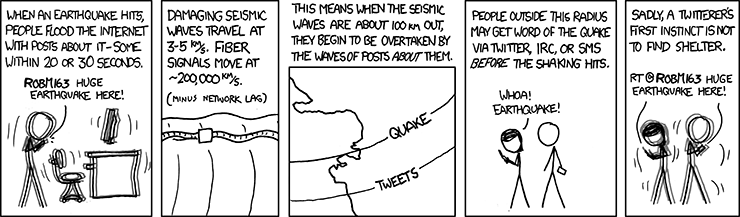
From a business to business perspective, Twitter can be a useful way for a business to see what is happening in their industry or in the markets their business effects. It has been said that Twitter messages can travel faster than earthquakes and other breaking news.  This can be very useful to businesses as if your product or immediate supply chain is impacted by the earthquake you can begin responding quickly having heard the news from Twitter.  A business could also use Twitter to pose a question to the great unknown for finding alternative suppliers or other resources affected by the disaster.  The immediacy of Twitter can be a great advantage to users who have a strong network. While many feel they need lots of followers sometimes it is better to know a few users really well rather than barely know anyone.  For businesses, this strategy of knowing who you follow and who follows you could help during a disaster.


Wednesday, May 25, 2016

foursquare facts

Foursquare is a mobile app that allows users to search, rate, and review local businesses. The service was created in 2008 and launched in 2009. In its original conception users were able to "check in" to the business/ location they were at and broadcast it to their friends/followers along with finding new places to visit. During the summer of 2014, Foursquare decided to revamp itself and created a companion app called Swarm. Swarm became the check in app and Foursquare the searching and reviewing app. You can now move easily between the two, starting by looking up restaurants near you on Foursquare and then pushing over to Swarm to check in when you have arrived at your destination. Each app has a button to push to the other app.

I have used Foursquare for over five years now and Swarm for the last two years. In the beginning businesses were able to give special discounts to those that had checked in and showed the discount code when checking out. For example, at Chili's if you checked in you received free chips and salsa with your meal. Other businesses have a percent off or their own freebie of some sort. The original Foursquare app would highlight the businesses having discounts to make it easy for consumers to find good deals. When the split came this disappeared. Foursquare also provided users with the ability to collect Mayorships of locations by checking in the most over the course of the month. This feature is now part of Swarm. Users of Swarm are also enticed with digital stickers and gold coins these days.

Businesses can use Foursquare in a variety of ways these days. Businesses are able to "claim" their listing which gives them access to various information and can allow the business to monitor reviews of their company and address any issues. They can also select what services to highlight (take credit cards, outdoor seating, etc), hours, menus and more allowing customers more information before they make a decision. Businesses can also use Foursquare to track peak traffic hours based on the number of check ins. According to wikipedia, "Claiming a venue can be done for free via mail which takes several weeks to process, or instantly with a credit card for a fee. In January 2013, Foursquare released 'Foursquare for Business', a mobile app that lets businesses manage their listing on Foursquare from their iOS device."
 For consumers, Foursquare operates mostly as a mobile site but there is a normal site available as well at https://foursquare.com/. Either way that you connect to the media, Foursquare allows users to search for very specific needs such as dinner in Strasbourg.  You can also narrow down your choices by price, specials, features, if it's open and more.  Some of this data used for filtering searches is provided by the company such as hours of operations and possibly the menu while some is provided by the users such as does this place have a nice ambiance or can you use a credit card.

Personally I use Swarm everyday to check in wherever I am visiting whether it be my home, school, work, or something social.  It is a way that my family has stayed connected while traveling around as you can figure out where the other person is to meet up with them or just know that they have arrived safely. Swarm also keeps a log of every place you have ever checked in so if you go back to the same city you can see where you have gone before and remember your journeys.  I enjoy collecting the stickers and winning the weekly battle among friends for who can collect the most coins. Mayorships and streaks are also a fun perk as they allow you to collect more coins. Below you can see screenshots of the Swarm app and some of my profile.  I am currently in the lead with 635 coins this week, I have collected 70 of 100 possible stickers and have a couple long streaks going for both mayorships and weeks in a row which will sadly be ending as I am traveling abroad currently.


Foursquare I use less often now that they have created the companion app Swarm.  Now I mostly use Foursquare when I am travelling to find new restaurants easily in the area or to edit information that is wrong.  Since I am traveling in Europe currently I have used Foursquare more frequently than when I am in Bowling Green since I do not know where anything is located.  Foursquare allows me to search for food, nightlife, fun things to do, shopping, and more.  It is all easy to use and the number of features accessible to consumers to find what they are looking for is incredible.  I wish I could give a comparison to Yelp but I have been using Foursquare for so long it is my go to search app. It can be a very useful app and I highly recommend it.


Monday, May 23, 2016

blogging basics

Everyone has an opinion on why blogging is important and the many benefits of blogging.  A quick google search presents you with lists upon lists of the reasons, benefits, and failures to avoid when blogging.  What appears on many "top reason to blog" lists include blogging is free, it lets you help others, it makes you a better writer, it's a marketing tool for your personal brand, it can increase your knowledge and confidence, and you can potentially make money from blogging.

So what exactly is blogging? And what is a blog? According to Merriam-Webster's Learner's Dictionary, a blog is "a web site on which someone writes about personal opinions, activities, and experiences." Blogging is "to maintain or add new entries to a blog" according to Dictionary.com. There are many ways for people to blog these days including blogger.com (which I am using), hosting their own website with a blog section, and even some social media's like tumblr can be considered a blog. With so many options it is best to pick the one that works best for you.

For this class I am using blogger.com to host this blog as it is free and relatively easy to use. Setting up your blog is also very easy and allows for a lot of customization.  You can change the format of your page, background colors, the font, and more to make it just the way you like.  When writing up blog entries the page looks similar to gmail's messaging for the text formatting options.  Blogger also provides the user with many easy to manipulate features such as adding pictures, videos, links, and page breaks.  Additionally, you are able to add labels or tags to your blog to make it more easily searchable, schedule your posts in the future, add your location or change the link for the specific blog.

Blogger.com also allows users to publicly and privately follow other blogs making it easy to stay in the know about what others are up to.  For this class I have tried to follow everyone else's blog to see what social media platforms others are choosing and what they are saying.  For businesses this could be very helpful to keep track of competition or those you buy from or sell to. Blogger also allows you to follow blogs privately so they will appear in your feed but they are not displayed on your profile.  This might be the way a company would follow competition.

For content of your blog the sky's the limit.  People blog about anything that is of interest to them, topics they are experts in, topics they wish to become experts in, random ponderings, life around them, reviews of products, or anything else they find of interest.  Many chose their blog topic based on who their target audience might be.  For this class, we are writing about social media platforms and other students in the class will be reading them.  For a business these are not as clear and may take some time to figure out who and what.

Lastly, as a social media platform Blogger works very well. Users are able to easily create and manage a blog and also interact with others through following them and commenting on their posts.  Readers of a Blogger blog do not need to be members so the reach of your blog is dependent on the individual's marketing ability and not limited to the users of the platform.  So far I have enjoyed the ease of blogging and experimenting with various formats and features. As the class continues it will be interesting to see how others are using the same platform but in unique ways.